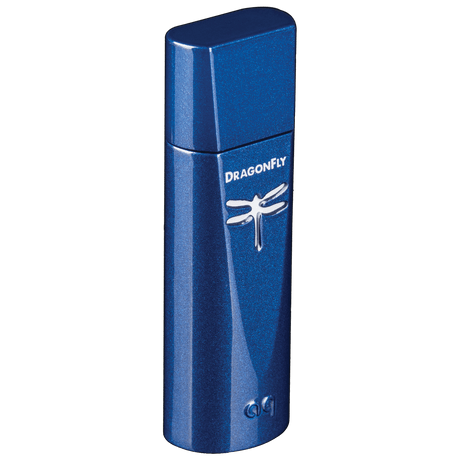
DragonFly Cobalt

USB Digital-to-Analog Converter

DragonFly Cobalt, the latest and most sophisticated member of the award-winning DragonFly franchise, is a USB DAC (digital-to-analog converter), preamplifier, and headphone amplifier. It bypasses the audio circuitry in laptops, computers, and smartphones to deliver cleaner, clearer, more naturally beautiful music to headphones, powered speakers, or complete audio systems.

Contact your authorized dealer for pricing

SKU: DRAGONFLYCOBG  |  UPC: 092592098398

Stay Connected! Register your DragonFly to activate your warranty and stay up to date on the latest AudioQuest news.

Hi-Res Music Partners

Description

With AudioQuest’s DragonFly USB DAC, music appreciation and exploration are limitless: Plug into an Apple or Windows computer or connect to an iOS or Android mobile device. Play YouTube or Vimeo videos. Go hunting on Bandcamp or SoundCloud. Explore playlists and podcasts on Spotify, Pandora, or Deezer. Stream high-res audio from Tidal or Qobuz. No matter the choice of sonic pleasure, DragonFly unravels the emotional expression and nuance that makes music and movies so enjoyable. Now, more than ever before, naturally beautiful sound is right at your fingertips—however you want it, whenever you want it. For easy reference, DragonFly's LED changes color to indicate playback status or sample rate. Note: A red lens indicates that the device is in standby mode; purple indicates MQA playback.

Plays all music files: MP3 to MQA and Hi-Res

  • Compatible with computers, tablets, streamers, and mobile devices
  • Includes DragonTail USB-C Extender Cable (iOS mobile devices require Apple Lightning-to-USB adaptor)
  • Resolution up to 24-bit / 96kHz
  • DAC Chip ESS ES9038Q2M DAC chip with minimum-phase slow roll-off filter for more natural sound

DragonFly Cobalt: Improved Performance, More Beauty!
Compared to previous models, DragonFly Cobalt incorporates some important new features, including a new, more advanced ESS ES9038Q2M DAC chip with a minimum-phase slow roll-off filter for more natural sound; a more sophisticated Microchip PIC32MX274 microprocessor that reduces current draw and increases processing speed by 33% over DragonFlys Black and Red; and improved power-supply filtering specifically designed to reduce the WiFi, Bluetooth, and cellular noise that plague mobile devices.

  • New, more advanced ESS ES9038Q2M DAC chip with a minimum-phase slow roll-off filter for more natural sound.
  • Microchip's superb PIC32MX274 microprocessor draws less current and increases processing speed by 33%.
  • Improved power-supply filtering that specifically increases immunity to WiFi, Bluetooth, and cellular noise.
  • Includes a form-fitting DragonTail female USB-A to male USB-C Adaptor.
  • All DragonTails use AQ's Carbon-level USB cable.

AudioQuest, Gordon Rankin: A Beautiful Partnership
Like all previous DragonFly models, Cobalt uses Gordon Rankin's precedent-setting StreamLength® asynchronous-transfer USB code. Further, in Gordon's monoClock® technology, a single ultra-low-jitter clock generated from the ESS ES9038Q2M DAC chip runs the ESS chip functions as well as all microcontroller functions. This superior clock enables DragonFly Cobalt to provide greater resolution and clarity than DACs with multiple clocks.

*Streamlength and monoClock are registered trademarks of Wavelength Audio, ltd.

Why the "Slow Roll...?"
Cobalt employs ESS's new flagship ES9038Q2M DAC chip. While the chips used in DragonFlys Black and Red are unbeatable for the price, the minimum-phase slow roll-off filter in the 9038 results in naturally expressive sound that is always emotionally engaging and never fatiguing—a beautiful combination of warmth and detail that we find equally exciting and soothing.

Killing the Noise
In Cobalt, we've taken what we've learned from our recent research and development in Noise-Dissipation to employ power-supply filtering specifically designed to dramatically reduce the increasingly prevalent noise from WiFi, Bluetooth, and cellular signals. Successfully combating this noise is absolutely crucial to the preservation of the lowest-level musical details, particularly when it comes to high-res audio—and especially when applied to a portable-audio device such as DragonFly.

Bit-Perfect Volume Control and 2.1-Volt Output
Cobalt features the same ESS Sabre 9601 headphone amp and bit-perfect volume control that give DragonFly Red its unique combination of power and grip over the music. This solution ensures maximum fidelity, thrilling dynamic contrast, and excellent signal-to-noise ratio. The 2.1-volt output makes Cobalt and Red compatible with a wide range of headphones, including power-hungry, low-efficiency models.

  • Plays All Music Files: MP3 to MQA and Hi-Res
  • Compatible with iOS Mobile Devices (requires Apple Lightning-to-USB adaptor) and Android Mobile Devices (requires USB adaptor)
  • Drives Wide Range of Low- to High-efficiency Headphones
  • Variable Output Drives Powered Speakers or Power Amp, Fixed Output Feeds Preamp or AV Receiver
  • Includes form-fitting Carbon-level DragonTail USB-A to USB-C adaptor
  • Native Resolution: Up to 24-bit / 96kHz
  • Output: 2.1 Volts
  • Volume Control: Digital: 64-Bit Bit-Perfect Volume Control
  • Desktop Compatibility: Windows 7 and later; Apple 10.6.8 and later; Linux (no tech support provided)
  • Mobile Compatibility: Apple iOS 5 and later; Android 5.0 and later. For Android devices, see owner's manual
  • DAC Chip ESS ES9038Q2M DAC chip with minimum-phase slow roll-off filter for more natural sound
  • Native Resolution up to 24-bit / 96kHz
  • Connectivity technology: Wired
  • Compatible with Apple and Windows PCs

Meet The DragonFly Fleet

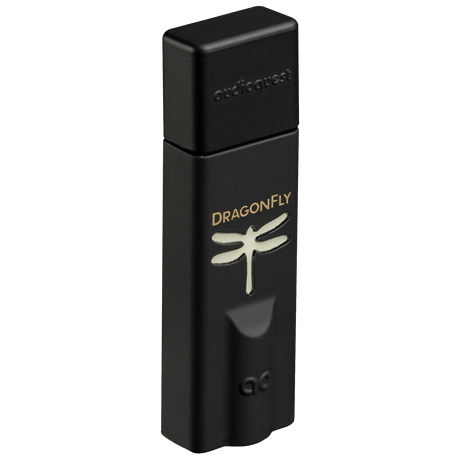
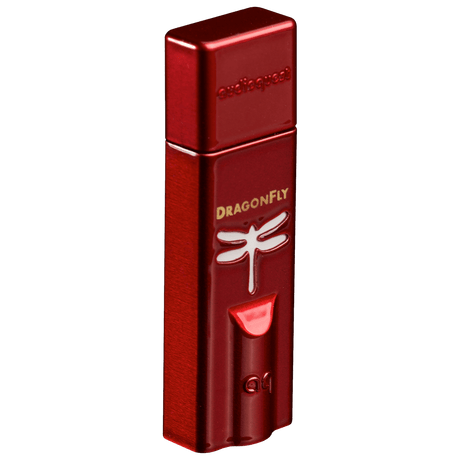
A table comparing the facets of 3 products
Facet
AudioQuest DragonFly Black - DRAGONFLYBLKG
DragonFly Black
View Details
AudioQuest DragonFly Red - DRAGONFLYREDG
DragonFly Red
View Details
AudioQuest DragonFly Cobalt - DRAGONFLYCOBG
DragonFly Cobalt
View Details
Price
Price
Regular price $129.95
Regular price $249.95
Regular price $199.95
Output
Output
1.2 volts
2.1 volts
2.1 volts
DAC Chip
DAC Chip
ESS ES9010 with minimum-phase fast roll-off filter
ESS ES9016 with minimum-phase fast roll-off filter
ESS ES9038Q2M DAC chip with minimum-phase slow roll-off filter for more natural sound
Mobile Compatibility
Apple iOS 5 and later; Android 5.0 and later
Desktop Compatibility
Windows 7 and later; Apple 10.6.8 and later; Linux (no tech support provided)

Frequently Asked Questions

What is a digital-to-analog converter (DAC)?

Little-known fact: Digital-to-analog converters are used in all digital devices that have the ability to send an audio signal or play music. These digital devices include (but are not limited to) CD players, laptops, computers, tablets, smartphones, and televisions. DACs are everywhere.

Simply put, a DAC, as its name suggests, converts digital audio information (comprising 1s and 0s) into an analog signal that can be sent to headphones, powered speakers, amplifiers, and/or receivers, to be heard and enjoyed by the listener.

Anytime you’re listening to music, watching a movie, or even enjoying a YouTube video on a computer, the digital audio data is first sent through a DAC that converts the 1s and 0s to the analog waveforms that our headphones and home stereos deliver to our ears as music.

The sound card that’s built into your computer and feeds its headphone jack is an example of a DAC. However, computers and most other digital devices are not optimized for sound. They have other priorities to meet and functions to fulfill — browsing the Internet, taking and sending photographs, sending and receiving emails and texts, and so much more. For most digital devices, delivering audio is just one of numerous functionalities, all of which are compromised to some extent.

Far superior sound — and, thus, much more beautiful, engaging music — can be enjoyed when using an external, purpose-built DAC, such as DragonFly.

What are the main differences between the various DragonFlys?

All DragonFlys are designed to preserve the body, warmth, and natural beauty in music.

In his review of Black, Red, and Cobalt, HiFi+'s Alan Sircom memorably concluded, "Whenever there are three products in a line, there’s a temptation to class them, “good, better, best!” but in this case, it’s, “good, better, bloody hell!”

We used to think of the progression as "beautiful," "more beautiful," and "most beautiful," but we like Alan Sircom's description even more.

Compared to the three earlier models, DragonFly Copper draws less current, outputs more power, and adds a high-conductivity copper-plated case for superior draining of RF noise.

Will DragonFly make my internal computer speakers sound better?

No. DragonFly does not use the internal speakers in your computer.

DragonFly is specifically designed to connect to external audio devices, such as headphones, powered desktop speakers, complete audio/video systems, and iOS and Android mobile devices.

Note: Historic models (DragonFly v1.0 and DragonFly v1.2) were designed to work with computers and laptops only; they were not designed for use with iOS and Android mobile devices. However, all currently available DragonFly models — Black, Red, Cobalt, Copper — are compatible with iOS and Android devices.

What kind of audio content can I play through DragonFly?

From MP3 to Hi-Res, DragonFly adds life, meaning, and color to all of your music.

With all current-production models of AudioQuest’s DragonFly USB DAC, music appreciation and exploration are limitless: Plug into an Apple or Windows® computer or connect to an iOS® or Android mobile device. Play YouTube videos. Go hunting on Bandcamp or SoundCloud. Explore playlists and podcasts on NTS Radio or Apple Music. Stream high-res audio from Tidal or Qobuz.

No matter the choice of sonic pleasure, DragonFly unravels the emotional expression and nuance that makes music and movies so enjoyable.

What is “asynchronous USB?”

Digital audio is stored in computers and delivered to DragonFly as 1s and 0s.

Contrary to common belief, making beautiful music out of 1s and 0s isn’t a case of simply getting all of the audio data from Point A to Point B. In order to successfully reconstruct the analog waveform, it’s crucial that subtle digital timing relationships are carefully maintained. Timing errors such as “jitter” have long plagued digital audio playback, and never more so than in recent years, as computers have been pressed into service as audio source components.

DragonFly uses a very sophisticated “asynchronous” USB audio data transfer protocol. Rather than sharing crucial audio “data clocking” functions with the computer, DragonFly alone, using asynchronous USB transfer, commands the timing of the audio data transfer, dramatically reducing digital timing errors.

DragonFly’s StreamlengthTM asynchronous USB code ensures low jitter, low resource load, minimal packet errors, world-class audio playback, and reliable connectivity between our DAC and any computing device compliant with USB Host Mode (as set forth by the USB Organization). Streamlength requires no additional drivers, making DragonFly virtually plug-and-play for Apple, Windows, iOS, and Android users.

What is a “sample rate”?

24Sample rate refers to the number of “snapshots” of sound, or samples per second, captured when a digital audio file is recorded or encoded.

Compact Discs have always functioned exclusively at 44.1kHz, which equals 44,100 samples per second. However, recording studios often master at much higher sample rates, such as 88.2kHz or 96kHz.

Online music downloads of higher sample rates are available from a variety of sources, including HDtracks, but the selection remains limited. Streaming services such as Tidal and Qobuz offer high-resolution files with sample rates up to 192kHz.

Can I use DragonFly with Windows operating systems?

Yes. Refer to DragonFly's manual for more details.

Can I use DragonFly with macOS?

Yes.

Can I use DragonFly with Apple iOS devices?

Yes.

DragonFly Copper comes equipped with a DragonTail USB-C adaptor, which allows the DAC to be quickly and easily connected to computers, tablets, and smartphones that have USB-C outputs. For connection to USB-A devices, simply remove the DragonTail to reveal DragonFly Copper’s USB-A plug.

An Apple Camera Adapter is required to connect DragonFly to an Apple Lightning device.

In our tests, Apple's Lightning-to-USB 3 Camera Adapter (with charging port) sounds better and is more reliable than Apple’s less expensive Lightning-to-USB Camera Adapter, while also providing the ability to charge during playback. Your mileage may vary. Some users prefer the size of the smaller adapter, while others prefer the performance of the larger adapter. We encourage experimentation.

Can I use DragonFly with Android devices?

Yes, provided that the device manufacturer has adhered to the USB specification and implementation, and supports audio over USB.

To verify that your Android device complies with isochronous USB audio, download and run USB Host Check.

In our early pre-production testing, we found that some Android devices (4.1 OS and newer) do not provide native support for audio over USB. If you find that your Android device (4.1 or newer) does not support audio over USB, we ask that you please contact the manufacturer of your device. To determine whether your device supports audio over USB, consult the user manual or visit the manufacturer’s website.

Despite Android’s support of USB audio output, there are still hardware manufacturers that do not completely adhere to the USB audio class specification. If you experience this, we recommend the USB Audio Player Pro application.

UAPP includes its own USB audio device driver that is compliant with the USB Organization’s USB Audio Host Mode Class specification. Further, it is compatible with various audio formats and will manage music on both the Android’s internal memory and inserted SD cards. With the phone connected to the Wi-Fi network, this application can also find and connect to DLNA servers/libraries. From Version 5, USB Audio Player PRO supports audio from Google Music, Tidal (including Tidal Masters), and Qobuz.

How do I set volume level when using DragonFly?

When using DragonFly with headphones, powered speakers, or a power amplifier, it functions in variable output mode, and we recommend the following steps:

  • Set the volume control of the associated music player application to maximum.
  • Set the computer’s main (operating system) volume control to 25% of maximum.
  • Using the computer’s main (operating system) volume control, adjust the volume to the desired level.

DragonFly Black is equipped with a 64-step analog volume control. With DragonFly Black connected to a PC or mobile device, adjusting the host’s system volume control will, through proxy, control the DragonFly Black’s onboard volume. This ensures maximum resolution and the highest sound quality, regardless of volume setting.

In DragonFly Red, Cobalt, and Copper, we were able to employ a highly sophisticated 64-step, 64-bit, bit-perfect digital volume control. It works similarly: With DragonFly connected to a PC or mobile device, adjusting the host’s system volume control will, through proxy, control the DragonFly’s onboard volume. Here again, we’ve optimized the volume control to ensure maximum resolution and the highest sound quality, regardless of volume setting.

You can also use DragonFly as a traditional fixed-output source component (such as a CD player, DVD player, or Blu-ray player), connected to a standard input on a receiver or preamplifier. When used in this manner, DragonFly functions in fixed output mode, which allows the overall volume level to be adjusted with the audio/video system’s master volume control. For this application, both the music player’s volume control and the computer’s main (operating system) volume level should be set to maximum.

DragonFly can play audio data at four different sample rates. Which one should I choose?

DragonFly will play music or audio data at sample rates of 44.1kHz, 48kHz, 88.2kHz, or 96kHz.

For the best sound quality, the computer should be configured so that it sends music and audio data to DragonFly that matches the native rate of the music. For example, since all CDs use a sample rate of 44.1kHz, 44.1kHz tends to be the “native rate” of most digital music. In most cases, for most people, this will be the best sample rate to choose.

Choosing a sample rate that is higher than the native rate of a music file will convert the audio data using mathematical approximations that can potentially decrease the sound quality.

Conversely, if you have high-resolution music files, configuring your computer for 44.1kHz (or any other lower sample rate) will cause the computer to down-sample your music to a lower resolution.

When possible, always configure the computer to output the native sample rate of the music you are listening to. Many of today's music player applications manage this process for you.

What do the various colors of DragonFly’s LED indicate?

DragonFly’s LED displays different colors to indicate status or sample rate of audio data.

DragonFlys Black and Red: Red = Standby; Green = 44.1kHz; Blue = 48kHz; Amber = 88.2kHz; Magenta = 96kHz; Purple = MQA.

DragonFly Cobalt: Red = Standby; Green = 44.1kHz; Blue = 48kHz; Yellow = 88.2kHz; Light Blue = 96kHz; Purple = MQA.

DragonFly Copper: Red = Standby; Green = 44.1kHz; Blue = 48kHz; Yellow = 88.2kHz; Light Blue = 96kHz.

I purchased high-resolution music files at 24-bit/176.4kHz or 24-bit/192kHz. Can I play these files using my DragonFly?

Yes. However, DragonFly performs best when audio data is processed at its native sample rate.

If you have higher resolution files, it is important to choose the correct higher sample rate in order to maximize the benefit of those files. For the best performance with sampling rates above DragonFly’s 96kHz ceiling, files should be played at a rate mathematically related to their native resolution. For instance, a 192kHz file should be played at 96kHz (i.e., 2 x 96000.0 = 192000.0).

By selecting sample rates that are directly divisible, the computer avoids having to do sonically degrading, complex math in its conversions, and allows DragonFly to sound its best.

Many of today's music playback applications will manage these conversions for the listener.

What music player applications does AudioQuest recommend?

While iTunes was once the easy and obvious answer, several higher-performance, add-on applications are available today. These include:

  • Amarra
  • Audirvana Plus
  • Bit Perfect
  • Pure Music

Stand-alone media players (for Apple and Windows) include:

  • JRiver is a complete audio and video media player, offering both USB and Network (airplay and DLNA) connectivity.
  • Roon works seamlessly with a local media collection and Qobuz and Tidal streaming services. Additionally, Roon enables streaming to multiple locations, and a complementary iPad application enables an external interface.
  • Qobuz and Tidal are subscription-based streaming services offering high-resolution music and high-definition videos as well as original editorial content.

For any technical support or questions regarding the functionality or use of these recommended playback applications, please contact the manufacturer. AudioQuest cannot provide technical support for any of these recommended playback applications.

Is it better to leave DragonFly constantly plugged in, or should I unplug it when it’s not in use?

It is completely safe to leave DragonFly plugged in at all times. We hope that you will always want it connected to your music playback device!

While repeatedly plugging and unplugging DragonFly will not affect its lifespan or reliability, in general we have found that DACs measure and sound better after being left on for at least 24 hours.

Do you recommend using JitterBug with DragonFly?

Our JitterBug USB filter is an easy and affordable upgrade that reduces the noise and ringing that plagues USB ports throughout audio systems.

We recommend using JitterBug either in series or in parallel to DragonFlys Black, Red, and Copper.

While we do suggest that you try using JitterBug in series with DragonFly Cobalt, because Cobalt employs some of JitterBug’s filtering, results may vary depending on the associated devices. When using Cobalt, you can still optimize the digital audio from a computer, car stereo, or other hardware by adding a JitterBug (in parallel) into a different USB port. Results may vary; experimentation is encouraged.